Home › Resources › Intrusion Detection Systems (IDS)
Intrusion Detection Systems (IDS)
Systems that watch network or host activity and alert on signs of attack.
Executive Summary
An intrusion detection system monitors network traffic or host activity for signs of malicious behavior and raises alerts when it finds them. It is a detective control that provides visibility and early warning, but it observes rather than blocks. Effective use depends on tuning to reduce noise and on connecting alerts to a response process.
What It Is
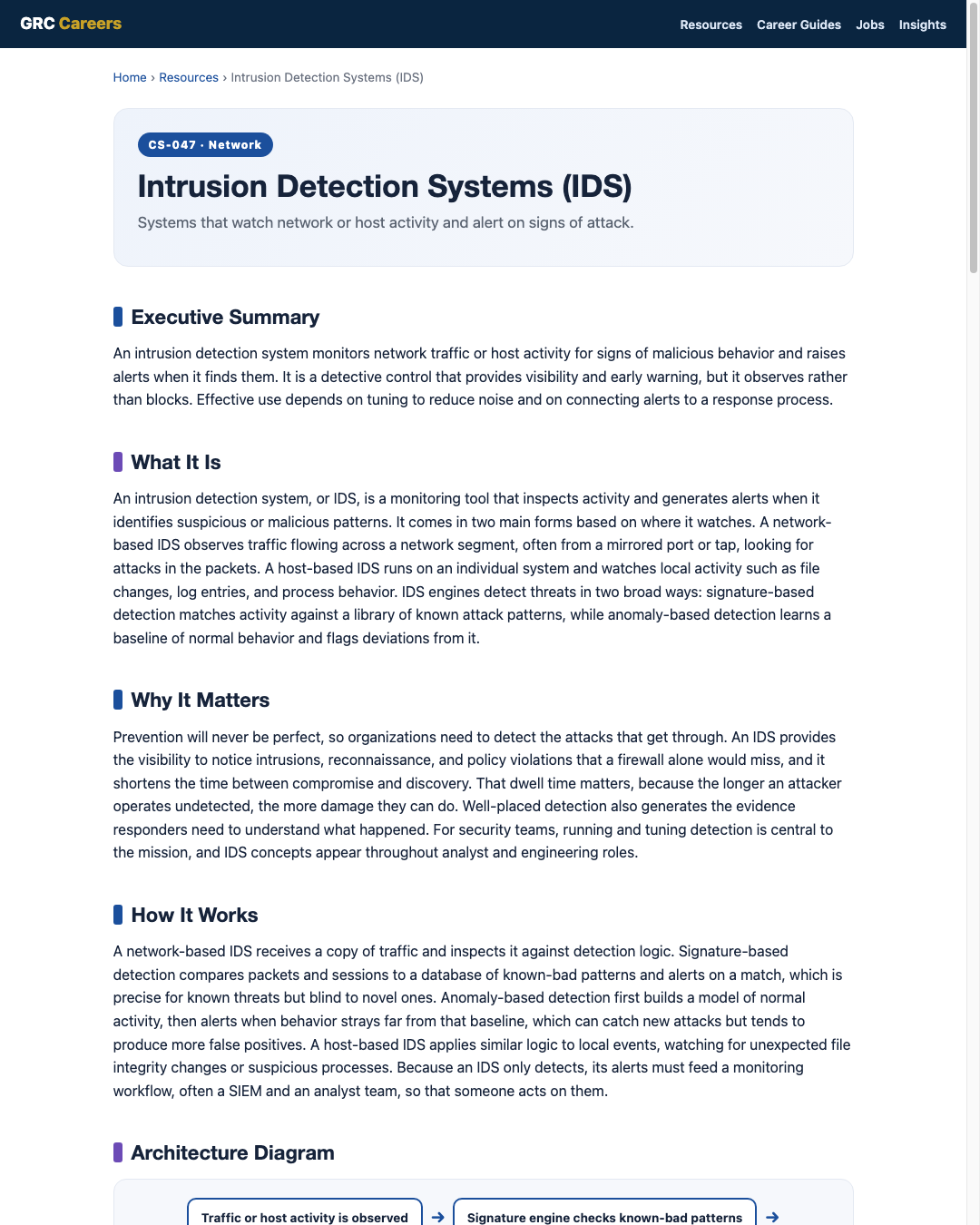
An intrusion detection system, or IDS, is a monitoring tool that inspects activity and generates alerts when it identifies suspicious or malicious patterns. It comes in two main forms based on where it watches. A network-based IDS observes traffic flowing across a network segment, often from a mirrored port or tap, looking for attacks in the packets. A host-based IDS runs on an individual system and watches local activity such as file changes, log entries, and process behavior. IDS engines detect threats in two broad ways: signature-based detection matches activity against a library of known attack patterns, while anomaly-based detection learns a baseline of normal behavior and flags deviations from it.
Why It Matters
Prevention will never be perfect, so organizations need to detect the attacks that get through. An IDS provides the visibility to notice intrusions, reconnaissance, and policy violations that a firewall alone would miss, and it shortens the time between compromise and discovery. That dwell time matters, because the longer an attacker operates undetected, the more damage they can do. Well-placed detection also generates the evidence responders need to understand what happened. For security teams, running and tuning detection is central to the mission, and IDS concepts appear throughout analyst and engineering roles.
How It Works
A network-based IDS receives a copy of traffic and inspects it against detection logic. Signature-based detection compares packets and sessions to a database of known-bad patterns and alerts on a match, which is precise for known threats but blind to novel ones. Anomaly-based detection first builds a model of normal activity, then alerts when behavior strays far from that baseline, which can catch new attacks but tends to produce more false positives. A host-based IDS applies similar logic to local events, watching for unexpected file integrity changes or suspicious processes. Because an IDS only detects, its alerts must feed a monitoring workflow, often a SIEM and an analyst team, so that someone acts on them.
Architecture Diagram
Visual Workflow
Common Attacks
- Evasion techniques that fragment or obfuscate traffic to slip past signatures
- Encrypted traffic that hides malicious content from network inspection
- Slow, low-volume activity designed to stay under anomaly thresholds
- Flooding the IDS with noise to bury a real attack among false alarms
- Attacks with no known signature that only anomaly detection might catch
Common Mistakes
- Deploying an IDS and never tuning it, drowning analysts in false positives
- Placing sensors where they cannot see the important traffic
- Assuming an IDS blocks attacks when it only detects them
- Ignoring alerts because alert fatigue has set in
- Failing to update signatures, leaving detection stale
Best Practices
- Tune signatures and thresholds to fit the environment and cut noise
- Place sensors with visibility into critical segments and choke points
- Combine signature and anomaly detection for broader coverage
- Feed alerts into a SIEM and a defined response workflow
- Keep detection content current and review effectiveness regularly
Quick Checklist
- Sensors are positioned to see critical traffic or hosts
- Signatures and detection content are kept up to date
- Detection is tuned so alerts are actionable, not overwhelming
- Alerts flow into a SIEM and a documented response process
- Detection coverage is reviewed and gaps are addressed
Recommended Tools
Inspects mirrored traffic for known and anomalous attacks
Watches file integrity, logs, and processes on a system
Aggregates and correlates IDS alerts with other security data
Provides deep inspection of traffic behind an alert
Industry Standards
Guide to intrusion detection and prevention systems
Maps adversary techniques that detection content should cover
Include continuous monitoring and detection practices
Career Relevance
IDS operation and tuning are daily work for SOC analysts, who triage the alerts, and for network security engineers and security engineers, who deploy and maintain the sensors. Understanding detection logic is essential for anyone in security operations or incident response. These are core, frequently interviewed skills across the roles that AI-Governance-Jobs.com serves.
Interview Questions
- What is the difference between an IDS and an IPS?
- How does signature-based detection differ from anomaly-based detection?
- What is the difference between a network-based and a host-based IDS?
- How would you reduce false positives in a noisy IDS deployment?
- How does encrypted traffic limit what a network IDS can detect?
Related Certifications
Further Reading
- NIST SP 800-94: Guide to Intrusion Detection and Prevention Systems
- MITRE ATT&CK
- CISA: Cybersecurity Best Practices
Key Takeaways
- An IDS detects and alerts on suspicious activity but does not block it.
- Network-based sensors watch traffic; host-based agents watch a single system.
- Signature detection catches known threats; anomaly detection can catch new ones.
- Untuned detection creates alert fatigue, so tuning is essential.
- Alerts only matter if they feed a monitoring and response workflow.
FAQ
What is the difference between an IDS and an IPS?
An IDS detects and alerts on suspicious activity but sits out of line and does not stop it. An IPS is placed in line with traffic and can actively block what it detects. Many products can operate in either mode depending on how they are deployed.
Which is better, signature or anomaly detection?
Neither alone is enough. Signature detection is precise for known attacks but blind to new ones, while anomaly detection can flag novel behavior but produces more false positives. Mature programs use both together to broaden coverage.
Can an IDS see encrypted traffic?
A network IDS cannot inspect the contents of encrypted traffic without decryption, so it sees only metadata such as addresses, ports, and timing. Host-based detection and selective decryption help address the visibility gap that encryption creates.
Related Careers
Related certifications
CompTIA Security+GIAC Certified Intrusion Analyst (GCIA)CompTIA CySA+Current openings
Suggested learning path
- Ground the basics with CS-001 Cybersecurity
- Study this sheet: Intrusion Detection Systems (IDS)
- Go deeper: Intrusion Prevention Systems (IPS)
- Go deeper: Firewalls
- Validate it: work toward CompTIA Security+
- Find the role: browse current openings