Spyware
Software that secretly collects information about a person or device without consent.
Lea esta ficha de referencia en español
Executive Summary
Spyware is malicious software that quietly gathers information about a user or device and sends it to a third party without permission. It can capture keystrokes, credentials, browsing habits, files, and screenshots. Because it is built to stay hidden, spyware often runs for a long time before anyone notices the data loss.
What It Is
Spyware is a category of malware whose main goal is surveillance and data theft rather than immediate disruption. Instead of encrypting files or crashing systems, it works to remain invisible so it can keep watching. The family covers several overlapping types: keyloggers that record every keystroke, infostealers that harvest saved passwords and browser data, tracking cookies and adware components that profile behavior for advertising, and stalkerware that a person installs on someone else's device to monitor them. Some spyware arrives bundled inside seemingly legitimate free software, while other variants are delivered through phishing, malicious downloads, or the exploitation of a vulnerability.
Why It Matters
The damage from spyware is often silent and cumulative. Stolen credentials can be reused to break into email, banking, and corporate systems, and captured business data can lead to fraud, espionage, or a larger breach. For organizations, an infostealer on a single laptop can expose the passwords to dozens of internal and cloud services at once, turning one infected endpoint into a network-wide problem. Stalkerware raises serious safety and legal concerns for individuals. For professionals, understanding spyware is core to endpoint defense, incident response, and privacy work, since the goal of the attacker is to see everything the victim sees.
How It Works
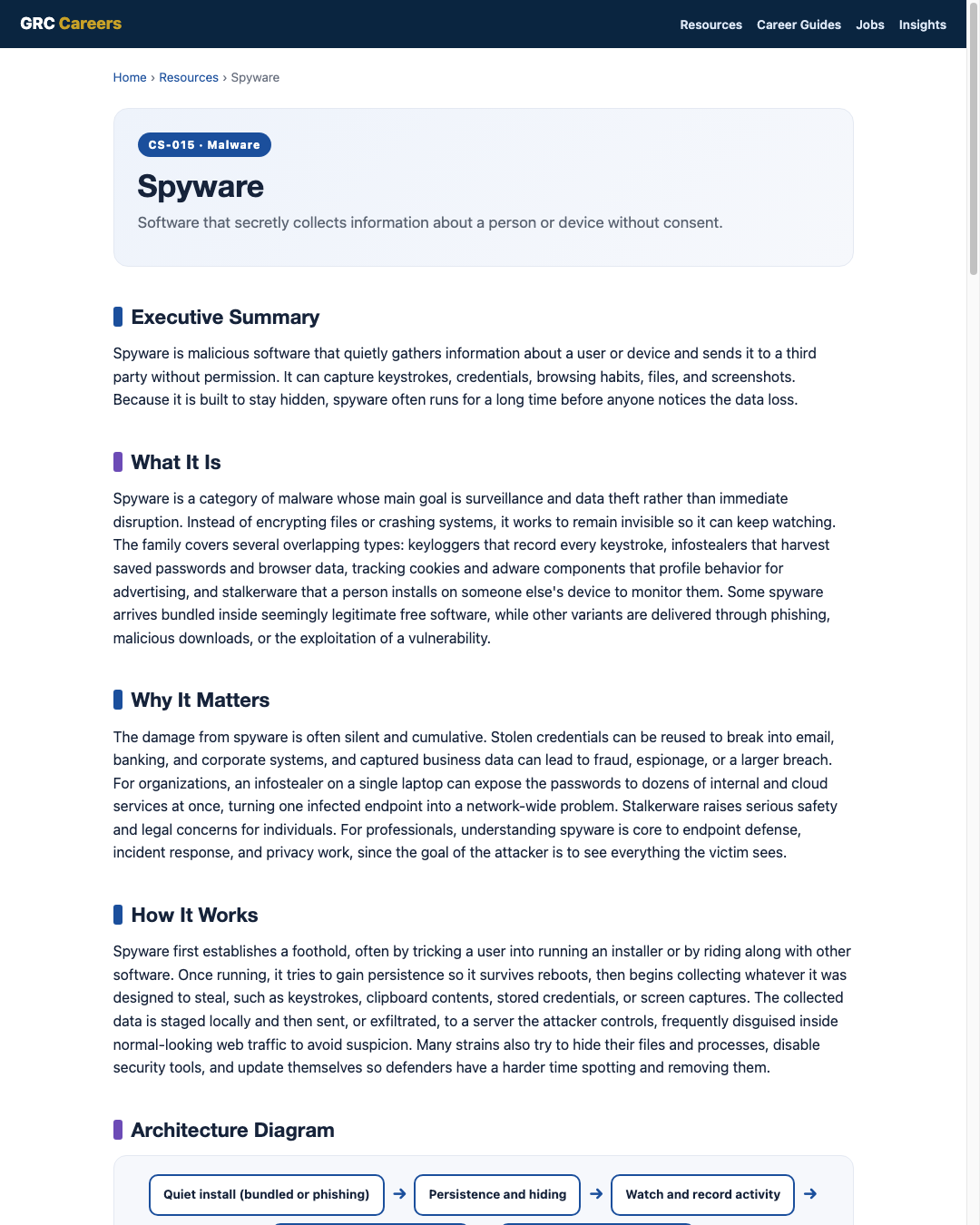
Spyware first establishes a foothold, often by tricking a user into running an installer or by riding along with other software. Once running, it tries to gain persistence so it survives reboots, then begins collecting whatever it was designed to steal, such as keystrokes, clipboard contents, stored credentials, or screen captures. The collected data is staged locally and then sent, or exfiltrated, to a server the attacker controls, frequently disguised inside normal-looking web traffic to avoid suspicion. Many strains also try to hide their files and processes, disable security tools, and update themselves so defenders have a harder time spotting and removing them.
Architecture Diagram
Visual Workflow
Common Attacks
- Keyloggers that record usernames, passwords, and messages as they are typed
- Infostealers that grab saved browser passwords, cookies, and autofill data
- Malicious downloads and cracked software that bundle hidden spyware
- Phishing attachments or links that install a surveillance payload
- Stalkerware installed on a device to monitor a specific person
Common Mistakes
- Assuming a quiet device is a clean device when spyware is designed to stay silent
- Cleaning the malware but never rotating the credentials it may have stolen
- Installing free software from untrusted sources without reading what it bundles
- Ignoring browser and mobile permissions that grant broad access to data
- Trusting a single scan instead of confirming with layered detection
Best Practices
- Run endpoint detection and response (EDR) or reputable antimalware and keep it updated
- Only install software from trusted, official sources and review requested permissions
- Enforce multi-factor authentication so stolen passwords alone are not enough
- Use a password manager instead of saving credentials in the browser
- Patch operating systems, browsers, and apps promptly to close entry points
- Educate users to recognize phishing and risky downloads
Quick Checklist
- EDR or antimalware deployed and current on all endpoints
- Multi-factor authentication enabled on email, admin, and financial accounts
- Software installs restricted to trusted sources or an approved catalog
- Browser password saving disabled in favor of a password manager
- Process to reset credentials after any suspected spyware infection
- Mobile devices reviewed for unexpected apps and excessive permissions
Recommended Tools
Detects surveillance behavior and enables containment and response
Scans for and removes known spyware and infostealers
Reduces the value of stolen credentials and avoids browser storage
Flags unusual outbound connections that may indicate exfiltration
Industry Standards
Guidance on preventing and handling malware incidents, including spyware
Computer security incident handling lifecycle used to respond to infections
Practical safeguards such as malware defenses and account management
Career Relevance
Spyware shows up daily for SOC analysts triaging alerts, incident responders scoping data loss, malware analysts reverse engineering samples, and security engineers hardening endpoints. Privacy and GRC professionals also care about spyware because it directly threatens confidential data and can trigger breach notification duties, the audience AI-Governance-Jobs.com serves.
Interview Questions
- How does spyware differ from ransomware in goals and behavior?
- What is an infostealer, and why is one infected laptop a bigger deal than it looks?
- How would you determine what data a piece of spyware could have accessed?
- Why is resetting credentials a critical step after a spyware infection?
- What controls reduce the impact of stolen passwords?
Related Certifications
Further Reading
- CISA: Cybersecurity Best Practices
- NIST SP 800-83: Guide to Malware Incident Prevention and Handling
- MITRE ATT&CK
Key Takeaways
- Spyware steals information quietly, prioritizing stealth over disruption.
- One infostealer infection can expose credentials to many services at once.
- Removing the malware is not enough, you must rotate any stolen credentials.
- Multi-factor authentication and a password manager blunt the damage.
- It is central to endpoint defense, incident response, and privacy work.
FAQ
How can I tell if a device has spyware?
Signs can include unexplained slowness, unexpected data usage, new toolbars or apps, and battery drain, but well-built spyware often shows no obvious symptoms. A scan with updated endpoint tools and a review of running processes and outbound connections is more reliable than looking for symptoms.
Is adware the same as spyware?
They overlap but are not identical. Adware focuses on serving unwanted ads, while spyware focuses on secretly collecting information. Some adware also tracks behavior, which blurs the line, so the two are often discussed together.
Does resetting passwords fix a spyware problem?
Resetting passwords is essential after an infection, but only after the spyware is removed. Otherwise the malware can simply capture the new passwords too, so remove or reimage first, then rotate credentials.
Related Careers
Related certifications
CompTIA Security+ISC2 Certified in Cybersecurity (CC)GIAC Reverse Engineering Malware (GREM)Current openings
Suggested learning path
- Ground the basics with CS-001 Cybersecurity
- Study this sheet: Spyware
- Go deeper: Adware
- Go deeper: Trojans
- Validate it: work toward CompTIA Security+
- Find the role: browse current openings