Adware
Unwanted software that pushes advertising and often tracks user behavior.
Executive Summary
Adware is unwanted software that displays or injects advertisements and frequently tracks browsing to profile the user. It usually arrives bundled with free software or through deceptive downloads. While some adware is merely annoying, more aggressive strains hijack browsers, weaken privacy, and open the door to more dangerous malware.
What It Is
Adware is software designed to generate advertising revenue for its operator, often at the expense of the user's experience and privacy. It ranges from bundled programs that add extra ads to web pages, to browser hijackers that change your homepage and search engine, to potentially unwanted programs (PUPs) that resist removal. Many adware programs also collect data about what you search for and visit, then use that profile to target ads or sell the information. Adware sits in a gray area between nuisance and malware, but its tracking behavior and bundling tactics push much of it firmly into the security conversation.
Why It Matters
Adware is common precisely because it is profitable and often flies under the radar as merely irritating. In practice it degrades performance, erodes privacy through tracking, and can inject content into pages that users trust, including fake update prompts or scam offers. Some adware pipelines have been abused to deliver more serious malware through malvertising, where a poisoned ad silently pushes a harmful payload. For organizations, adware clutters endpoints, generates support tickets, and can be an early warning that a device is picking up untrusted software. For professionals, recognizing and cleaning it is a routine part of endpoint hygiene and user support.
How It Works
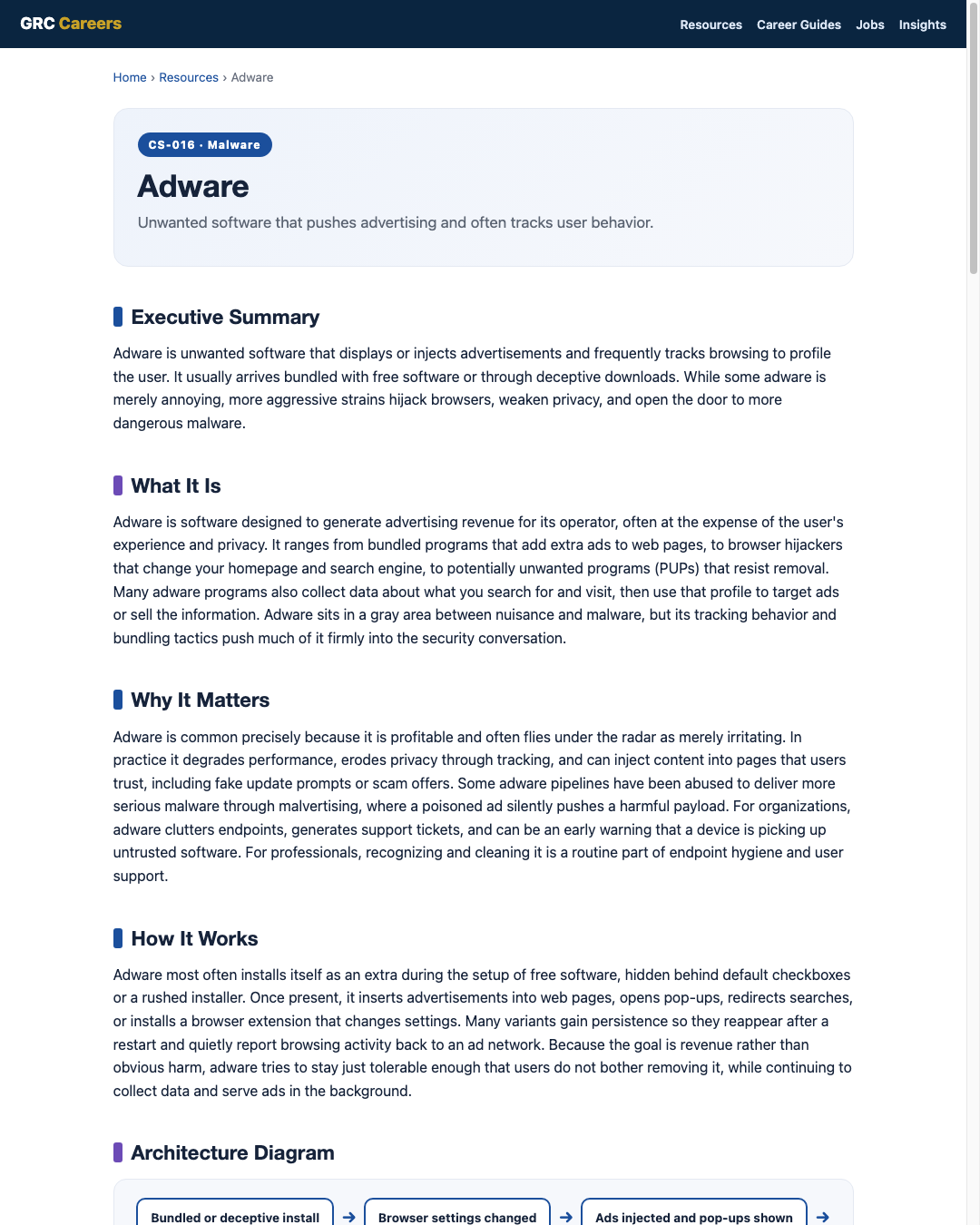
Adware most often installs itself as an extra during the setup of free software, hidden behind default checkboxes or a rushed installer. Once present, it inserts advertisements into web pages, opens pop-ups, redirects searches, or installs a browser extension that changes settings. Many variants gain persistence so they reappear after a restart and quietly report browsing activity back to an ad network. Because the goal is revenue rather than obvious harm, adware tries to stay just tolerable enough that users do not bother removing it, while continuing to collect data and serve ads in the background.
Architecture Diagram
Visual Workflow
Common Attacks
- Bundling adware inside free software installers behind default checkboxes
- Browser hijackers that change the homepage, search engine, and new-tab page
- Malicious or deceptive browser extensions that inject ads
- Fake update or download buttons that install unwanted programs
- Malvertising that uses ad networks to deliver more harmful payloads
Common Mistakes
- Rushing through installers and accepting bundled extras without reading
- Dismissing adware as harmless and ignoring its tracking and injection behavior
- Removing the visible ads but leaving the browser extension or startup entry behind
- Downloading software from ad-heavy mirror sites instead of official sources
- Assuming an ad blocker alone removes adware already installed on the device
Best Practices
- Install software only from official sources and use custom install to decline extras
- Keep browsers, extensions, and the operating system patched
- Limit and review browser extensions, removing anything unnecessary
- Use endpoint protection that flags potentially unwanted programs
- Apply least privilege so users cannot silently install unwanted software
- Train users to recognize fake download buttons and update prompts
Quick Checklist
- Endpoint protection configured to detect potentially unwanted programs
- Browser extensions reviewed and reduced to what is needed
- Software sourced from official vendors or an approved catalog
- Users guided to use custom install and decline bundled offers
- Ad and script controls in place where appropriate
- Process to reset browser settings after an adware cleanup
Recommended Tools
Detects and removes adware and potentially unwanted programs
Flags unwanted software and unusual browser or process behavior
Controls allowed extensions and locks key browser settings
Reduces exposure to malvertising and injected ads
Industry Standards
Guidance on preventing and handling malware, including unwanted programs
Malware defenses and control of installed software and browsers
Control families covering configuration management and least privilege
Career Relevance
Adware is bread-and-butter work for help desk and endpoint support, SOC analysts who see it as a signal of risky user behavior, and security engineers who tune policies to block unwanted software. Privacy and GRC professionals track its data-collection behavior, and its overlap with malvertising keeps it relevant to incident response, the audience AI-Governance-Jobs.com serves.
Interview Questions
- How does adware differ from spyware, and where do they overlap?
- What is a potentially unwanted program, and how does it usually get installed?
- How would you clean a browser hijacker so it does not return after reboot?
- What is malvertising, and why does it make adware a security concern?
- Which controls reduce the chance of adware being installed in the first place?
Related Certifications
Further Reading
- CISA: Cybersecurity Best Practices
- NIST SP 800-83: Guide to Malware Incident Prevention and Handling
- MITRE ATT&CK
Key Takeaways
- Adware pushes ads and often tracks behavior to make money for its operator.
- It usually arrives bundled with free software or via deceptive downloads.
- It ranges from a nuisance to a real risk when tied to malvertising.
- Full cleanup means removing extensions, programs, and startup entries, not just the ads.
- Safe install habits and endpoint controls prevent most infections.
FAQ
Is adware dangerous or just annoying?
Much adware is annoying and privacy-invasive rather than destructive, but some strains inject scam content or connect to malvertising pipelines that deliver worse malware. Treat it as a real signal of risky software on the device, not just a cosmetic issue.
How did adware get on my computer?
The most common route is bundling, where adware is installed as an optional extra during the setup of free software. Deceptive download buttons and untrusted browser extensions are other frequent sources.
Will an ad blocker remove adware?
An ad blocker can reduce ads and lower exposure to malvertising, but it does not remove adware already installed on the device. You still need to uninstall the program, remove the extension, and reset browser settings.
Related Careers
Related certifications
CompTIA Security+CompTIA A+ISC2 Certified in Cybersecurity (CC)Current openings
Suggested learning path
- Ground the basics with CS-001 Cybersecurity
- Study this sheet: Adware
- Go deeper: Spyware
- Go deeper: Mobile Malware
- Validate it: work toward CompTIA Security+
- Find the role: browse current openings