FileVault
Full-disk encryption for macOS that protects data when a Mac is lost or stolen.
Executive Summary
FileVault is the full-disk encryption feature built into macOS. It protects the data on a Mac so that a lost or stolen device does not expose its files. On modern Macs it works closely with hardware security, tying the encryption to the user's login credentials and to keys protected by the Mac's secure hardware.
What It Is
FileVault is macOS disk encryption that keeps the contents of the drive unreadable until the correct credentials unlock it. On Macs with Apple silicon or a security chip, the drive is encrypted with keys protected by the Secure Enclave, and FileVault ties the ability to decrypt to a user account so the data becomes accessible only after a valid login. A recovery key exists as a backup unlock method in case a password is lost. In managed environments, organizations enable FileVault through mobile device management and escrow the recovery key so the device stays recoverable and the key is not left solely on the machine.
Why It Matters
Macs travel, and a lost or stolen laptop without encryption can hand over every file to whoever holds it by moving the drive or booting into recovery. FileVault turns that scenario from a reportable data breach into a lost piece of hardware. Many regulations and contracts require encryption of data at rest on portable devices, so FileVault is frequently both a compliance requirement and a practical protection. For professionals managing Mac fleets, enabling and managing FileVault and its recovery keys is a core endpoint security responsibility.
How It Works
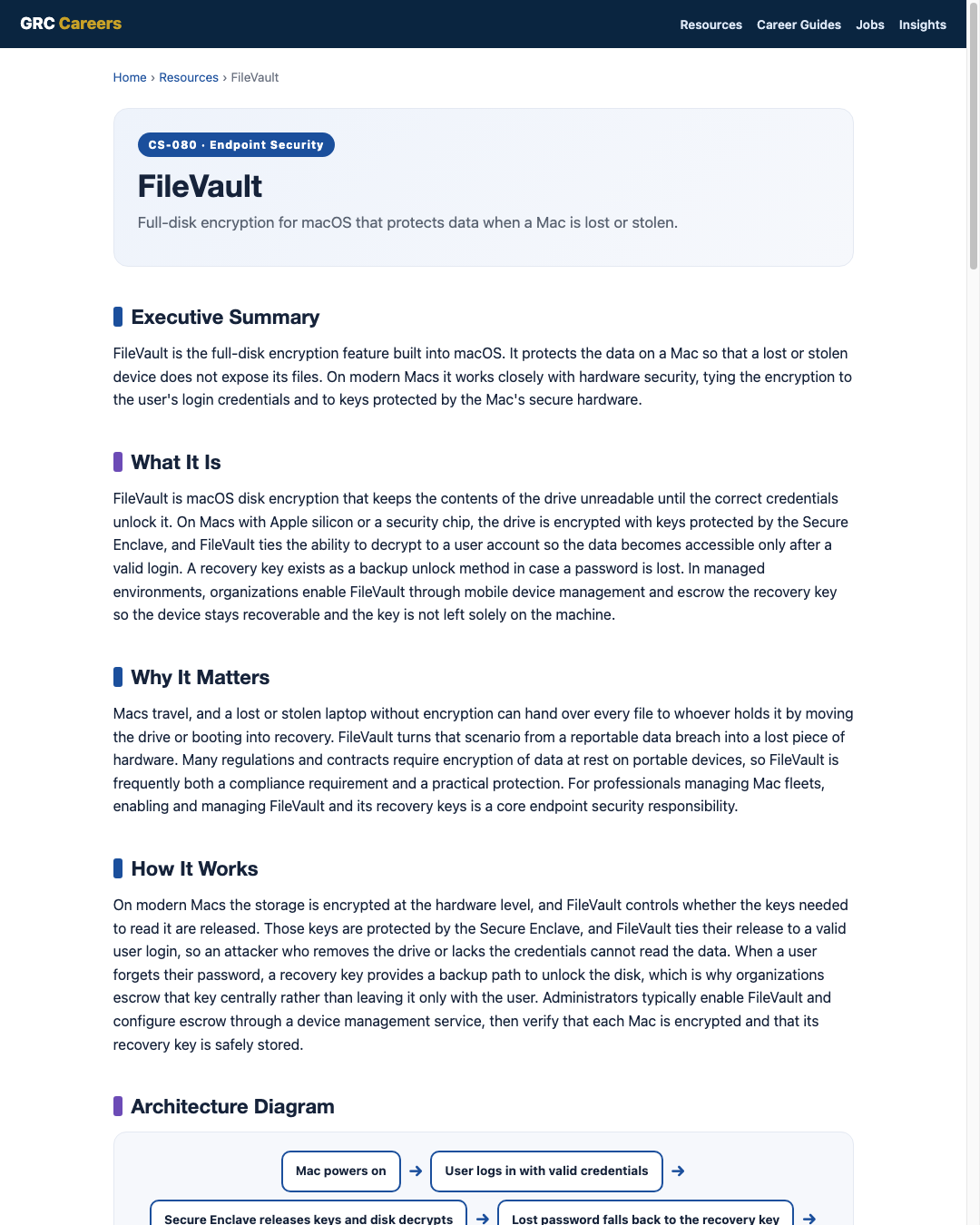
On modern Macs the storage is encrypted at the hardware level, and FileVault controls whether the keys needed to read it are released. Those keys are protected by the Secure Enclave, and FileVault ties their release to a valid user login, so an attacker who removes the drive or lacks the credentials cannot read the data. When a user forgets their password, a recovery key provides a backup path to unlock the disk, which is why organizations escrow that key centrally rather than leaving it only with the user. Administrators typically enable FileVault and configure escrow through a device management service, then verify that each Mac is encrypted and that its recovery key is safely stored.
Architecture Diagram
Visual Workflow
Common Attacks
- Theft of a Mac to read data offline when encryption is absent
- Removing the drive or booting to recovery to access files without encryption
- Attempts to capture keys from a running or sleeping device
- Social engineering to obtain a recovery key from a help desk
- Exploiting Macs left unencrypted because FileVault was never enabled
Common Mistakes
- Not enabling FileVault on portable Macs by policy
- Failing to escrow recovery keys, leaving devices unrecoverable
- Assuming encryption is on without verifying status across the fleet
- Leaving Macs unlocked or in sleep with no re-authentication requirement
- Storing recovery keys insecurely or only on the device
Best Practices
- Require FileVault on all portable Macs by policy
- Enable and manage FileVault through mobile device management
- Escrow every recovery key to a secure central location automatically
- Verify encryption and recovery-key status through management reporting
- Require a strong login password and re-authentication after sleep
- Protect help-desk recovery-key release with identity verification
- Pair encryption with device management, screen locks, and remote wipe
Quick Checklist
- FileVault enabled on all portable Macs
- Recovery keys escrowed centrally and verified
- Encryption status monitored through device management
- Strong login password enforced with re-authentication after sleep
- Help-desk recovery process gated by identity checks
- Remote lock and wipe configured for lost devices
- Unencrypted Macs identified and remediated
Recommended Tools
Built-in macOS full-disk encryption for the system drive
Enables FileVault, escrows keys, and reports encryption status
Hardware that protects the keys used to decrypt the disk
Central, secure backup of the key needed to unlock a Mac
Industry Standards
Guidance on storage encryption for data at rest on end user devices
Standard for validated cryptographic modules used by encryption
Includes recommended FileVault configuration settings
Career Relevance
FileVault deployment and key management are routine for endpoint security engineers, IT security administrators, and Mac-focused device management teams, and they appear in SOC and incident work when Macs are lost. Security engineers and GRC auditors verify encryption of data at rest against policy and regulation, part of the audience AI-Governance-Jobs.com serves.
Interview Questions
- How does FileVault protect data, and what role does the Secure Enclave play?
- Why is escrowing recovery keys essential when deploying FileVault at scale?
- How would you enable and verify FileVault across a fleet of Macs?
- What does full-disk encryption protect against, and what does it not protect against?
- How would you handle a lost Mac and a user who forgot their password?
Related Certifications
Further Reading
Key Takeaways
- FileVault is built-in macOS full-disk encryption that protects data at rest.
- It ties decryption to a valid login and to keys protected by the Mac's secure hardware.
- Escrowing recovery keys centrally keeps devices recoverable when passwords are lost.
- Managing FileVault through device management gives policy, escrow, and reporting at scale.
- Encryption defends a lost device, but not a running, unlocked one, so pair it with strong sign-in.
FAQ
Is FileVault the Mac equivalent of BitLocker?
Yes, in role. FileVault provides full-disk encryption for macOS just as BitLocker does for Windows. Both protect data at rest and rely on secure hardware and centrally escrowed recovery keys in managed environments.
What happens if a user forgets their Mac password?
The escrowed recovery key can unlock the disk. This is why organizations enable FileVault through device management with key escrow, so the help desk can recover access after verifying the user's identity.
Does FileVault protect a Mac that is stolen while unlocked?
No. Like all full-disk encryption, it protects data at rest when the device is off or the drive is removed. A running, unlocked Mac is not protected by encryption alone, so screen locks and re-authentication after sleep remain important.
Related Careers
Related certifications
CompTIA Security+Apple Certified Support ProfessionalJamf Certified Tech (device management track)Current openings
Suggested learning path
- Ground the basics with CS-001 Cybersecurity
- Study this sheet: FileVault
- Go deeper: BitLocker
- Go deeper: macOS Security
- Validate it: work toward CompTIA Security+
- Find the role: browse current openings